
If you are integrating your webshop or business software with Szamlazz.hu, we recommend setting up an API test connection before you start issuing live invoices.
Test mode lets you verify that your integration works correctly without creating real invoices.
How do I create a test API ("Számla Agent") account?
Register a completely new invoicing account and, after logging in, switch it to test mode immediately.
Do not connect the account to the Hungarian Tax Authority (NAV), as this will prevent you from using the account for testing.
Do not start a subscription for the test account.
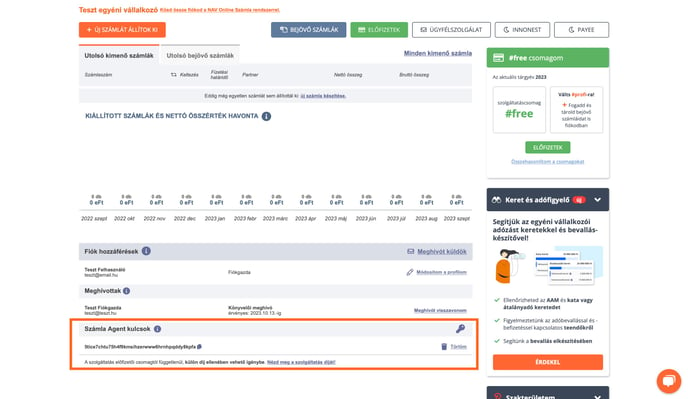
You can enable test mode from the Dashboard ("Vezérlőpult"). In the same place, under the Számla Agent kulcsok section, you can generate the API key for your test account.
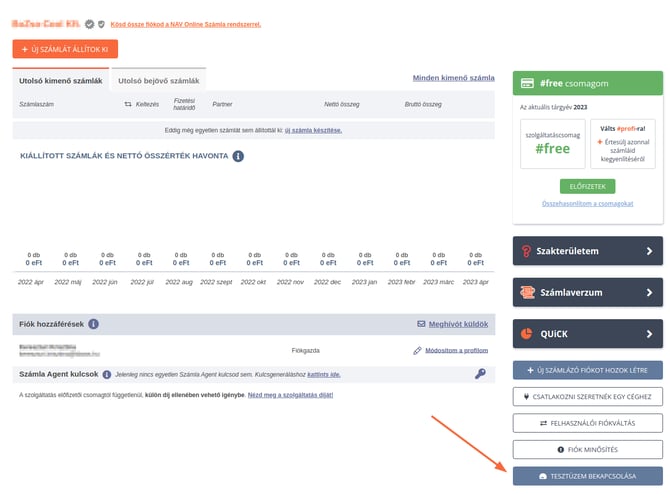
Once test mode is enabled:
- your account is temporarily upgraded to the #profi package free of charge,
- you can issue test invoices only,
- notification emails cannot be sent to external email addresses, only to the email address you used to register the test account.
Test mode can only be enabled if no invoices have been issued from the account or no NAV connecton has been set up yet.
How do I generate an API ("Számla Agent") key for testing?
An API ("Számla Agent") key provides secure authentication between your business application/webshop and your invoicing account, enabling the software to communicate through API connection.
Only the account owner ("fiókgazda") or an administrator ("adminisztrátor") can generate API keys.
To create a key:
- Log in to your invoicing account.
- On the Dashboard ("Vezérlőpult"), locate the Számla Agent kulcsok section and click the key icon.
- Copy the generated key to your clipboard and paste the key into your webshop, external software. The key is ready to use immediately.
How do I connect my webshop to a Számlázz.hu test account?
After enabling test mode and generating the API key, configure your webshop or business software to connect your Szamlazz.hu account with the help of our API documentation:
API - Számla Agent documentation for developers.
In test mode, you can verify that your application can successfully create invoices. These documents are treated as a test invoices.
How do I switch back from test to live mode?
After you have successfully tested your integration, switch your account back to live mode by clicking on the blue TESZTÜZEM VÉGE ("Exit test mode") icon on the top of the screen.
Once test mode is disabled, you will notice the following changes:
- All test invoices are deleted automatically.
- The temporary #profi package is removed and your account returns to the #free package.
- You can start any subscription plan you prefer via the menu "Beállítások / Szolgáltatáscsomagom".
How can I test API ("Számla Agent") functionality if I already use an active API connection?
If your webshop or business software is already connected to your invoicing account and is issuing live invoices, you will not be able to switch it to test mode.
Instead, create a separate invoicing account dedicated to testing by following the steps below:
- Log in to your existing invoicing account.
- Go to the menu Egyéb / Új számlázási fiók.
- Create a new invoicing account using the same company details as your current account.
- Enable test mode for the new account as described above.
- Generate a new API key for the test account and set up the connection.
Keep your live account and test environment separate. Perform all development and testing processes with the dedicated test account, free of charge.