
Choosing the right Számlázz.hu package depends on how you use the system and which features you need.
You can issue an unlimited number of paper-based invoices free of charge, while the paid subscriptions offer additional automation, integrations and advanced features to support your business.
What kind of Számlázz.hu packages can I choose from?
Számlázz.hu offers four different packages:
- #free – unlimited paper-based invoicing at no cost (for manual invoicing).
- #start – includes additional invoicing features, such as electronic invoices, recurring invoices and multiple user access.
- #digital – adds bank integration, automatic payment status updates and further automation tools.
- #profi – our most comprehensive package, including online financial data connection, incoming invoices, digital archiving and additional integrations.
What features are included in each package?
Számlázz.hu offers four packages, each designed for different business needs. Compare their key features below to find the one that best fits your business.
What does the #free package include?
Best if you only need reliable online invoicing with basic functions.
The key features are:
- unlimited paper-based invoicing,
- NAV-compliant invoicing,
- automatic partner data completion,
- invoice notifications and payment requests,
- accountant access,
- invoice templates and basic customisation.
What does the #start package include?
Ideal if you need additional invoicing features for your growing business. In addition to everything included in #free, it offers:
- issuing electronic invoices,
- foreign language and multi-currency invoicing,
- pro forma and prepayment invoices,
- reports, and data exports,
- recurring invoices, draft invoices and invoice copying,
- multiple users with permission management,
- payment tracking and automatic payment reminders.
What does the #digital package include?
Designed for businesses that want to automate their invoicing and payment processes.
In addition to everything included in #start, it offers:
- bank integration,
- automatic invoice and bank transaction matching,
- automatic payment status updates,
- automatic invoicing from pro forma invoices,
- online payment solutions for your customers.
What does the #profi package include?
Our most comprehensive package for businesses that need advanced integrations and accounting automation.
In addition to everything included in #digital, it offers:
- digital invoice archiving,
- management of outgoing and incoming invoices in one place,
- Online Financial Data Connection for accounting systems,
- import of invoice data from the NAV Online Invoice system for invoices created in external systems,
- exclusive BinX offer for #profi subscribers.
For up-to-date pricing and a detailed comparison of all package features, visit our Hungarian Packages and prices page.
You can use your browser's built-in translation feature to view the page in English.
How can I change my current subscription package?
You can change your Számlázz.hu package in the "Beállítások / Szolgáltatáscsomagom" (Settings / My subscription package) menu.
-
Upgrade from the #free package
If you are using the #free package, go to the "Beállítások / Szolgáltatáscsomagom" (Settings / My subscription package) page and select the package that best suits your business.
-
Upgrade your current subscription
If you already have a paid subscription, you can switch to a higher package at any time. Go to "Beállítások / Szolgáltatáscsomagom" (Settings / My subscription package), click "Módosítom" (Modify), then select your new package.
The fee you've already paid for your current package is automatically deducted from the cost of your new subscription.
-
Downgrade your current subscription
If you want to switch to a lower package, go to "Beállítások / Szolgáltatáscsomagom" (Settings / My subscription package), click "Módosítom" (Modify), and select your preferred package.
Your current package will remain active until the end of your current billing period.
If you downgrade your subscription, the new package will only become active after your current subscription period ends.
If you switch to another paid package, the subscription fee must be paid when you request the change.
If you upgrade your subscription, the new features are available in your account immediately.
How can I cancel my subscription?
If you no longer need your subscription, you can cancel it from the "Beállítások / Szolgáltatáscsomagom" (Settings / My subscription package) menu.
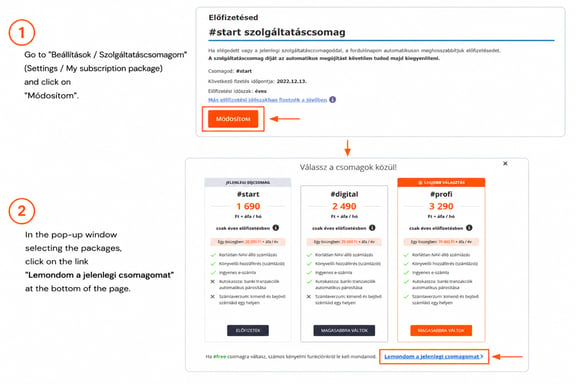
Before you cancel your subscription, make sure that:
- you have no unpaid subscription fees or charges for additional paid services,
- apart from the Account Owner (fiókgazda), only one Accountant (read-only) (könyvelő – olvasási joggal) user may remain assigned to the account. If there are any additional users, the Account Owner must remove them before the subscription can be cancelled.
- you download and save any invoices from previous years that you may need, as only invoices from the current calendar year will remain available in the #free package.
Your paid package remains available until the end of your current subscription period. After that, your account is automatically switched to the #free package.
Still have questions?
If you have any questions about our packages, pricing or managing your subscription, our Customer Support team is here to help.
You can reach us at info@szamlazz.hu, or contact us directly from your Számlázz.hu account by clicking "Ügyfélszolgálat" (Customer Support).