
You can invite colleagues or your accountant to your Számlázz.hu account and assign different permission levels based on what they need to do. If you manage multiple businesses, you can also access all of them with the same login.
You can invite colleagues, employees or your accountant to your invoicing account.
- Accountant (read-only access) is available in every package, including #free.
- Other user roles require at least a #start subscription.
What permission levels are available?
You can assign one of the following permission levels (user role) when inviting a new user:
-
Account Owner (Fiókgazda):The owner of the invoicing account with full control over the account. Each invoicing account can have only one Account Owner.
-
Administrator (Adminisztrátor): Full account management, including managing users, permissions and account settings.
-
Operator (Kezelő): Can issue invoices and credit notes, manage partners and settings, run reports and export accounting data.
-
Accountant (read-only) (Könyvelő – olvasási jog): Provides read-only access to invoices, reports, lists, and accounting data exports, without permission to create or modify data.
-
Accountant (can issue invoices) (Könyvelő – számlázhat): Includes read-only access plus the ability to issue invoices and pro forma invoices, perform bulk actions, send payment requests and manage partners and products.
-
Invoicing (Számlázó): Can create invoices and credit notes, manage partners and settings, and send invoice notifications and payment requests.
-
Auditor (Könyvvizsgáló): Read-only access for auditing purposes.
-
Custom permissions (Egyedi jogosultság): A custom combination of permissions defined by the Account Owner or an Administrator.
How do I invite colleagues or an accountant?
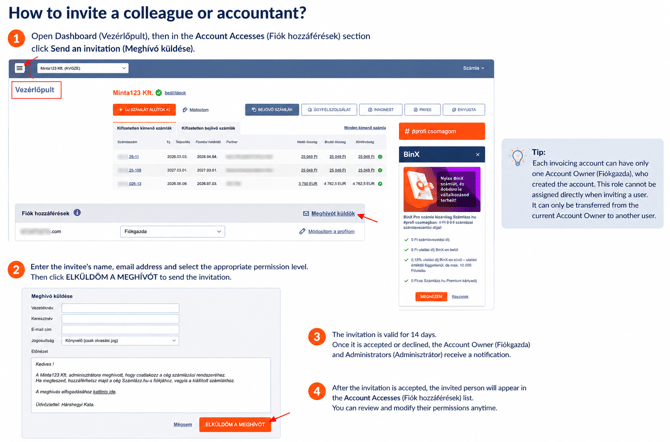
- Open Dashboard (Vezérlőpult).
- In the Account Accesses (Fiók hozzáférések) section, click Send an invitation (Meghívó küldése).
- Enter the invitee's name, email address, and select the appropriate permission level.
- Send the invitation.
The invitation remains valid for 14 days. Once it has been accepted or declined, the Account Owner (Fiókgazda) and Administrators (Adminisztrátor) receive a notification.
If the invited user already has a Számlázz.hu account, they can simply accept the invitation and sign in with their existing login details. The new company will be added to their existing user profile.
How can I manage multiple companies with one login?
You can create multiple invoicing accounts with the same email address:
- Log in to your existing Számlázz.hu account.
- From the Egyéb menu, select Új számlázási fiók.
- Complete the company registration.
After that, you can switch between companies using the drop-down menu in the upper-left corner, without logging out.
Can I merge companies with different login email addresses?
Yes. If your companies are currently registered with different login email addresses, you can move them under a single login by inviting (see above) your existing user profile to the other company and transferring the Account Owner role (on the Dashboard).
Can I separate companies that currently use the same login?
Yes. If one of your companies should be managed by another person (for example, after selling the business), you can:
- invite the new owner as an Administrator,
- let them accept the invitation,
- transfer the Account Owner role via the Dashboard (Vezérlőpult),
- the new Account Owner can remove your own access from the account.
Our Customer Service team can only assist with access-related requests if they are sent while you are logged in ("Ügyfélszolgálat" icon) to the affected invoicing account, allowing us to verify your identity.