
If you are to connect your webshop or business application to Szamlazz.hu so that invoices can be issued automatically from your own system, we recommend using a Számla Agent (API) key.
What is an API or Számla Agent key and what is it used for?
A Számla Agent key is a unique API key that provides a secure connection between your application and your invoicing account, making authentication simpler and more secure than using a username and password.
We recommend using a separate Számla Agent key for each webshop or external application. This allows you to manage each integration separately and makes it easier to track where invoices were created.
How do I create an API (Számla Agent) key?
Only account owners ("fiókgazda") and administrators ("adminisztrátor) can generate API keys for an account.
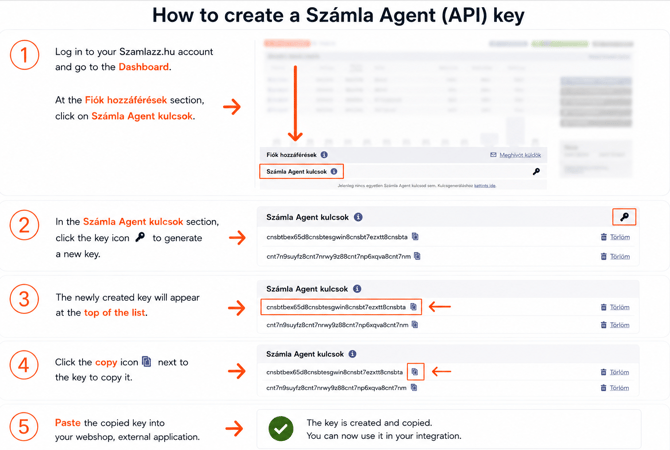
To generate a new key:
- Log in to your Szamlazz.hu account.
- On the Dashboard ("Vezérlőpult"), scroll to the Számla Agent kulcsok section and click the key icon to generate the API key.
- Copy and paste the key into your external application, it is ready to use right after the creation.
Where do I use the Számla Agent key in my API request?
When sending a request via API, include your Számla Agent (API) key in the szamlaagentkulcs field within the beallitasok (settings) section of the XML request.
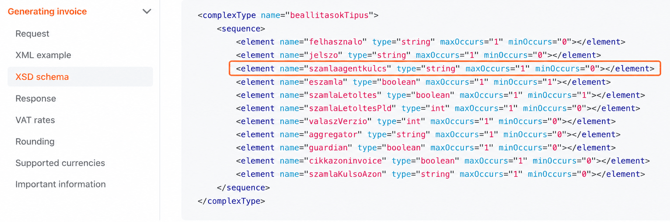
When using a Számla Agent key, the felhasznalo (user) and jelszo (password) fields are no longer required.
The key is for API use only; you cannot log in to the Számlázz.hu website with it.
For the complete XML structure and technical specification, check the Számla Agent (API) documentation:
Számla Agent (API) documentation
How do I delete a Számla Agent key?
If you no longer need a Számla Agent key, you can delete it at any time:
-
Go to the Dashboard ("Vezérlőpult").
-
Open the Fiók hozzáférések section, then
-
select Számla Agent kulcsok and click the "Törlöm" (Delete) icon next to the key you want to remove.

Deleting a Számla Agent key immediately disconnects the webshop or external application that uses it. Make sure the key is no longer required before deleting it.
Can I use a Számla Agent key with a #free account?
Yes, you can create and use Számla Agent keys with the #free package as well as with any subscription plan.
The service is charged monthly in arrears, based on the number of documents that were issued automatically via API during the previous month.
Please note that Számla Agent is a separate, add-on service. It is not included in any subscription package, but can be used alongside any plan, including the #free package.
You can create multiple Számla Agent keys regardless of your subscription package.