The Számla Agent key (API key) is a unique, 42-character identifier that lets your webshop or other external system (business application, ERP software) connect securely to your Számlázz.hu account and issue documents automatically. The key replaces the username/password pair: we recommend it for all new integrations, but integrations created earlier with a username and password continue to work. If you are a developer, see the Számla Agent developer documentation as well.
Where do you find the key, and how do you generate a new one?
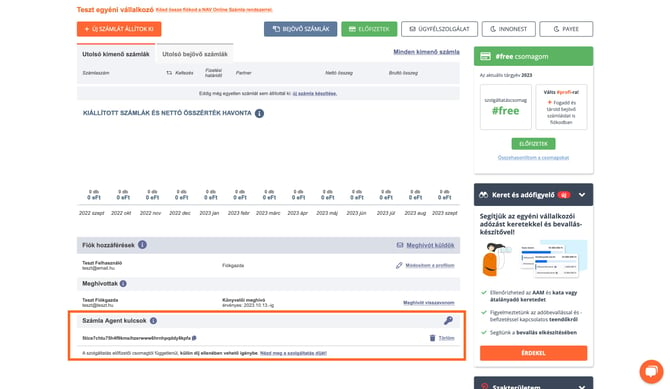
- Log in to your Számlázz.hu account and click the invoice icon in the top left corner to open the Dashboard (Vezérlőpult).
- Scroll to the bottom of the page, to the Számla Agent kulcsok (Számla Agent keys) section below the users.
- Click the key icon on the right side of the section. The new key is created instantly and is ready to use right away.
- Use the copy icon next to the key to copy it to your clipboard with one click, then paste it into the appropriate field of your webshop module.
Only users with account owner („fiókgazda") or administrator rights can generate and delete keys. If you cannot see the Számla Agent kulcsok section, ask the account owner.
What should you watch for when using the key?
- One invoicing account can have at most 17 keys at a time.
- All keys have identical permissions: there is no per-key restriction, each key allows the same operations.
- A key only grants access to the invoicing account it was generated in. If you have several invoicing accounts, each one needs its own key.
- Keys do not expire: a key stays valid until you delete it.
- You cannot log in to the Számlázz.hu website with the key; it is used exclusively for system-to-system (API) communication.
The key is case sensitive, and the system only accepts it in lowercase. We suggest to always copy and paste the key instead of typing it, and make sure no extra spaces end up before or after it.
If you use an older webshop module that has no separate API key field, you can paste the key into both the username and the password fields (the same key in both).
How do you delete a key, and what happens then?
In the Dashboard / Számla Agent kulcsok section, click the Törlöm (Delete) link at the end of the key's row, then confirm the deletion.
Deletion takes effect immediately: automatic invoicing stops in the webshop or external system that uses the key. If you generate a new key to replace it, update it in the external system as well.
Treat the key like a password: do not share it publicly and do not give it to unauthorized people. If the key has leaked, delete it, generate a new one, and update it in your external system.
Systems integrated with Számlázz.hu and connected to your account may automatically create their own key in your account when you connect them. These keys appear masked in the list with the name of the system and cannot be copied, because they are used exclusively by that system. If you delete such a key, invoicing through that system stops.
How much does it cost to use the Számla Agent key (API key)?
Generating a key is free, but using it starts the actual use of the Számla Agent service.
Entering the key of a live (non-test) invoicing account into an external system (webshop, website, other business application) allows that system to send document creation requests to Számlázz.hu, which can result in a proforma invoice, invoice, or delivery note being issued in your account. Automatic invoicing from an external system is a paid service, and you have to pay even after a single document.
If you only want to test the connection, create a test account and enter its key in the external system: automatic invoicing in a test account is free of charge. For details, read the article How do I establish a test API connection with Számla Agent?